Key Takeaways
- Learning how to prioritise workload effectively means combining clear task lists, realistic deadlines, and structured prioritisation techniques to stay focused on high-impact work.
- Understanding how to prioritise workload helps teams reduce distractions, avoid missed deadlines, and manage urgent and important tasks more confidently.
- Techniques such as the Eisenhower Matrix, batching, delegation, and single-tasking improve focus, support better time management, and increase productivity.
- Project management software strengthens workload prioritisation through automation, resource visibility, reporting dashboards, and improved collaboration across teams.
In today’s demanding workplace, knowing how to prioritise workload is essential. A project manager might be dealing with overdue approvals, urgent client requests, stakeholder updates, shifting deadlines, and limited resource availability all at the same time. Without a clear way to decide what matters most, the working day can quickly become a cycle of reacting rather than progressing.
Workload prioritisation is also a business performance issue. Gallup’s 2026 State of the Global Workplace report found that only 20% of employees worldwide were engaged in 2025, with low engagement costing the global economy an estimated $10 trillion in lost productivity.
That is why prioritisation is not just about getting more done. It is about helping people focus on the right work, reduce unnecessary pressure, and make better decisions when time and resources are limited.
This guide shares practical techniques for tackling urgent and important tasks, managing complex work, and staying productive without burning out. Each strategy will help you focus on key priorities, complete work on time, and reduce the risk of missed deadlines.
Table of contents:
1. The to-do List
2. Understand the Importance Matrix
3. Due dates and time-sensitivities
4. Templates and Workflow Automation
5. Involving Team Members and Stakeholders
6. Avoiding Multitasking
7. Dealing with Procrastination
8. End-of-day Reviews
9. Avoiding Distractions
10. Leveraging Project Management Software

1. Creating a workload to-do list
One of the fundamental steps in learning how to prioritise workload is to create a clear, manageable task list. This does not need to be complicated. In fact, the most useful workload lists are often simple enough to maintain every day.
Rather than writing down vague reminders such as “finish report” or “sort client feedback”, try to capture enough detail to help you make decisions about what needs your attention first.
A practical workload to-do list might include:
The task: What needs to be done
The deadline: When it needs to be completed
The effort involved: Whether it is a quick task or something that needs focused time
Any blockers or dependencies: Whether you are waiting on another person, decision, or piece of information
The impact: What happens if the task is delayed
For example, instead of writing ‘Finish report’, You could write ‘Finish monthly project report — due Friday, needs finance figures, high priority because it goes to the steering group.’
This is still a simple to-do list entry, but it gives you much more useful information. You can immediately see that the task has a deadline, a dependency, and a clear business impact. That makes it easier to decide whether it should be done now, chased up, scheduled for later, or escalated.
The aim is not to turn every task into a mini project plan. It is to make your workload visible enough that you can prioritise it sensibly. Quick admin tasks may only need a short note. More important tasks may need a little more context, especially if they involve other people or affect key deadlines.
As new tasks come in, keep your list up to date and review it regularly. This gives you a realistic view of what is urgent, what is important, what is blocked, and what can wait.

2. How to Prioritise Workload with the Urgent Important Matrix
To prioritise your workload effectively, it helps to distinguish between tasks that are urgent and tasks that are genuinely important.
The urgent-important matrix, often called the Eisenhower Matrix, is a simple way to sort tasks into four categories:
- Important and urgent: Do first
- Important but not urgent: Schedule
- Urgent but not important: Delegate or reduce
- Not urgent and not important: Eliminate
Used well, this can help you avoid spending your whole day reacting to the latest request, email, or meeting invite. But there is a caveat: the matrix only works if you are clear about what “important” actually means.
In a busy workplace, almost everything can be made to sound urgent. A senior stakeholder needs an update. A client wants a response. A colleague is blocked. A meeting needs preparation. If urgency is defined by whoever shouted loudest or chased most recently, the matrix quickly becomes useless.
Instead, importance should be judged against business outcomes. Ask:
-
Does this task affect a key deadline?
Does it unblock other people or teams?
Does it reduce risk?
Does it support a strategic objective?
Does it have a direct impact on customers, stakeholders, revenue, compliance, or delivery?
That context is what turns the matrix from a generic productivity tool into something useful for real workload management.
Quadrant 1: Important and urgent (Do first)
These are tasks that need immediate attention because they are both time-sensitive and genuinely important. They may affect project delivery, client commitments, compliance requirements, revenue, or senior stakeholder decisions.
Examples might include resolving a delivery blocker, responding to a serious client issue, preparing for a decision-making meeting, or completing work that is needed before another team can move forward.
These tasks should be handled first, but if too much of your workload sits in this quadrant, it may be a sign that planning, resourcing, or communication needs to improve.
Quadrant 2: Important but not urgent (Schedule)
These tasks matter, but they do not need to be done immediately. This is often where the most valuable work sits: planning, process improvement, stakeholder management, training, risk reduction, and strategic thinking.
The problem is that these tasks are easy to postpone because they do not create immediate pressure. But ignoring them often creates more urgent work later.
For example, reviewing project risks may not feel urgent today, but delaying it could lead to a bigger issue next month. Scheduling this work protects time for the tasks that prevent problems rather than simply reacting to them.
Quadrant 3: Not important but urgent (Delegate)
These tasks demand attention, but they do not necessarily need your direct involvement. They may include routine queries, status updates, admin requests, or meetings where your input is not essential.
This quadrant is where many people lose time, especially when urgency comes from other people’s priorities rather than business value.
Where possible, delegate these tasks, redirect them to the right person, automate them, or set clearer boundaries. If you cannot delegate, look for ways to reduce the time they take.
Quadrant 4: Not important and not urgent (Eliminate)
These tasks do not meaningfully contribute to your goals and do not need immediate action. They might include unnecessary meetings, duplicated reporting, low-value admin, or work that no longer has a clear purpose.
The best approach is to remove, minimise, or challenge them. In some cases, this means asking whether the task still needs to happen at all.
The urgent-important matrix is most useful when it creates better conversations about workload. It should help teams agree what matters most, challenge false urgency, and make trade-offs visible.
 Timesheet tools: How they improve productivity and reduce costs
Learn more about how timesheet tools can streamline reporting and reduce wasted resources.
3. Set due dates and time-sensitive tasks
When you are learning how to prioritise workload, setting due dates is one of the clearest ways to stay on top of commitments. But not every deadline should be treated in the same way.
A common mistake is to put a date against every task without asking whether that date is fixed, flexible, or simply preferred. This can make everything feel urgent, even when some tasks have room to move.
Before prioritising time-sensitive work, it helps to separate your deadlines into three types:
- Fixed deadlines: Dates that cannot move, such as client delivery dates, compliance submissions, event dates, board meetings, or contractual milestones.
- Preferred dates: Dates that matter, but could be adjusted if priorities change.
- Internal target dates: Dates set to keep work moving, but not necessarily linked to an external commitment.
For each time-sensitive task, it is also useful to note what the deadline depends on. For example, a task may be due on Friday, but only achievable if another team provides information by Wednesday. Without that dependency, the deadline may look simple when it is actually at risk.
A useful task entry might look like this:
-
Prepare client performance report — fixed deadline Friday 12pm, waiting for final analytics data by Wednesday, escalate if not received by 3pm.
This gives you more than a date. It tells you whether the deadline can move, what might block delivery, and when action is needed to keep the work on track.
Setting due dates also helps manage stakeholder expectations. If a deadline is unrealistic, it is better to flag it early than quietly accept it and miss it later. This might mean explaining what can be delivered by the requested date, what would need to be deprioritised, or where additional support is required.
4. Use templates and workflow automation
Templates and workflow automation help teams prioritise workload by making repeatable work easier to plan, assign, and track.
For example, a project initiation template could automatically create key tasks such as business case approval, risk review, benefits check, reporting milestones, and dependency checks. This means important governance and delivery tasks are visible from the start, rather than being added later when they become urgent.
Workflow automation can also help tasks move in the right order. Approval can trigger the next stage of work, overdue actions can prompt reminders, and high-risk items can be flagged for senior attention.
Tools such as PM3 can support this by standardising project templates, automating task flows, and giving teams a clearer view of workload across multiple projects. The aim is simple: spend less time managing process manually and more time focusing on the work that affects delivery, benefits, and stakeholder outcomes.
5. Involve team members and stakeholders
Workload prioritisation is rarely just an individual decision. In project environments, priorities often compete across teams, departments, and senior stakeholders. One person may see a task as urgent because it affects their deadline, while another may see it as lower priority because it has limited impact on the wider project.
This is why team members and stakeholders should be involved in prioritisation, especially when resources are stretched or priorities are changing. Their input helps clarify what work matters most, where dependencies exist, and which trade-offs need to be made.
A practical way to do this is to run a short prioritisation review. In 30 minutes, the team can review the main tasks, identify blockers, and agree what should happen next. To avoid subjective decisions, use clear criteria such as:
- Impact on project outcomes
- Deadline or milestone risk
- Dependency on other teams
- Stakeholder or customer impact
- Resource availability
This keeps the conversation focused on evidence rather than whoever is pushing hardest. It also makes it easier to challenge unrealistic expectations, escalate resource conflicts, and explain why some tasks need to move ahead of others.
Involving stakeholders does not mean giving everyone equal say over every decision. It means creating enough visibility for better decisions to be made. When teams understand the reasons behind priorities, they are more likely to support them, adjust their own workload, and keep important work moving.
 Project RAG Status Meanings and Best Practices
6. Avoid multitasking
Multitasking can feel like a way to get through a heavy workload faster, but it often has the opposite effect. In most project and knowledge work, multitasking usually means switching rapidly between tasks rather than making real progress on several things at once.
The problem is not simply that multitasking feels busy. The American Psychological Association explains that moving between tasks creates “switching costs”, reducing efficiency and increasing risk, particularly when the work is complex or unfamiliar. In practice, this means your brain has to pause, reorientate, and reload the context of each task every time you switch, which makes focused work harder to sustain.
Important tasks such as reviewing project risks, preparing a client update, writing a report, or resolving a delivery issue need focused attention. If they are constantly interrupted by emails, meetings, messages, and smaller admin tasks, they are likely to take longer and become more error-prone.
A better approach is to protect time for single-tasking where it matters most. Choose the priority task, remove obvious distractions, and work on it for a focused block of time before moving on. Lower-value tasks, such as routine admin or quick follow-ups, can be batched separately.

7. Deal with procrastination
Procrastination in project work is often a sign that something is unclear. People delay tasks when ownership is vague, requirements are ambiguous, dependencies are missing, or the work involves difficult stakeholder conversations.
Instead of treating procrastination as a motivation problem, look for the blocker. Ask:
-
Who owns the next action?
What information is missing?
Is the task too large or poorly defined?
Are we avoiding a decision or stakeholder challenge?
Is another team blocking progress?
Once the cause is clear, the task becomes easier to prioritise. A vague task such as “sort reporting issue” might become “confirm reporting requirements with finance by Tuesday, then update the project dashboard.” That is easier to act on because the next step, owner, and deadline are clear.
For larger tasks, break the work into the smallest useful next action. If progress depends on someone else, chase or escalate the dependency early. If the task is uncomfortable because it involves pushback, schedule the conversation rather than letting the delay create a bigger problem later.
 Project Evaluation: A Complete Guide for Managers
Discover how to assess outcomes with confidence in our article on project evaluation.
8. End of day review
End each work day with a short prioritisation check. This does not need to take more than five minutes, but it helps you start the next day with a clearer plan.
Run through five checks:
-
What moved forward today?
What is still blocked?
What has become urgent?
Who needs an update?
What is tomorrow’s one priority?
Use the answers to update your task list, carry forward anything important, and flag issues early. The aim is to close the day with clarity, so tomorrow’s workload starts with direction rather than guesswork.
9. Avoid distractions
To stay focused and complete tasks on time, you need more than a well-organised task list. You also need to protect your attention.
This is not just a personal discipline problem. Microsoft’s 2025 Work Trend Index analysis found that employees are interrupted every two minutes on average during core work hours by meetings, emails, or chats. That level of disruption makes it much harder to stay focused on urgent and important work.
Clear boundaries, communication blocks, and protected focus time can help you reduce interruptions and keep your workload on track.
Here are some practical ways to avoid distractions and maintain control over your workload:
- Set specific work hours: Establish dedicated work hours, and communicate them to colleagues, family members and friends. During these times, make it clear that you are not available for non-urgent matters.
- Use focus techniques: Employ techniques like the Pomodoro Technique, time blocking, or deep work sessions to create periods of uninterrupted focus.
- Silence notifications: Turn off or silence non-essential notifications on your devices to prevent them from pulling you away from your tasks.
- Create a distraction-free workspace: Designate a workspace that is free from common distractions. Keep it organised and conducive to productivity.
- Prioritise tasks: Use a priority list to identify the most important and high-priority tasks, which should receive your full attention.
- Time management software: Utilise time management or website-blocking software to limit access to distracting websites or apps during work hours.
- Batch communication: Set specific times to check and respond to emails, messages and calls, rather than addressing them immediately as they come in.
- Delegate tasks: Delegate tasks when possible to trusted team members or colleagues, reducing your workload and freeing up your focus for high-priority tasks.
- Practice mindfulness: Mindfulness techniques can help you stay present and resist the temptation of distractions. Regular mindfulness practices can improve your focus and reduce stress.
- Establish boundaries: Clearly communicate your boundaries to friends, family and colleagues. Let them know when you’re available for social interaction and when you need to focus on work.
- Physical breaks: Schedule short, purposeful breaks between work sessions to refresh your mind and reduce the chances of being distracted.
10. Leverage project management software
Effective workload prioritisation and project management depend not only on skills and processes but also on having the right tools to support them.
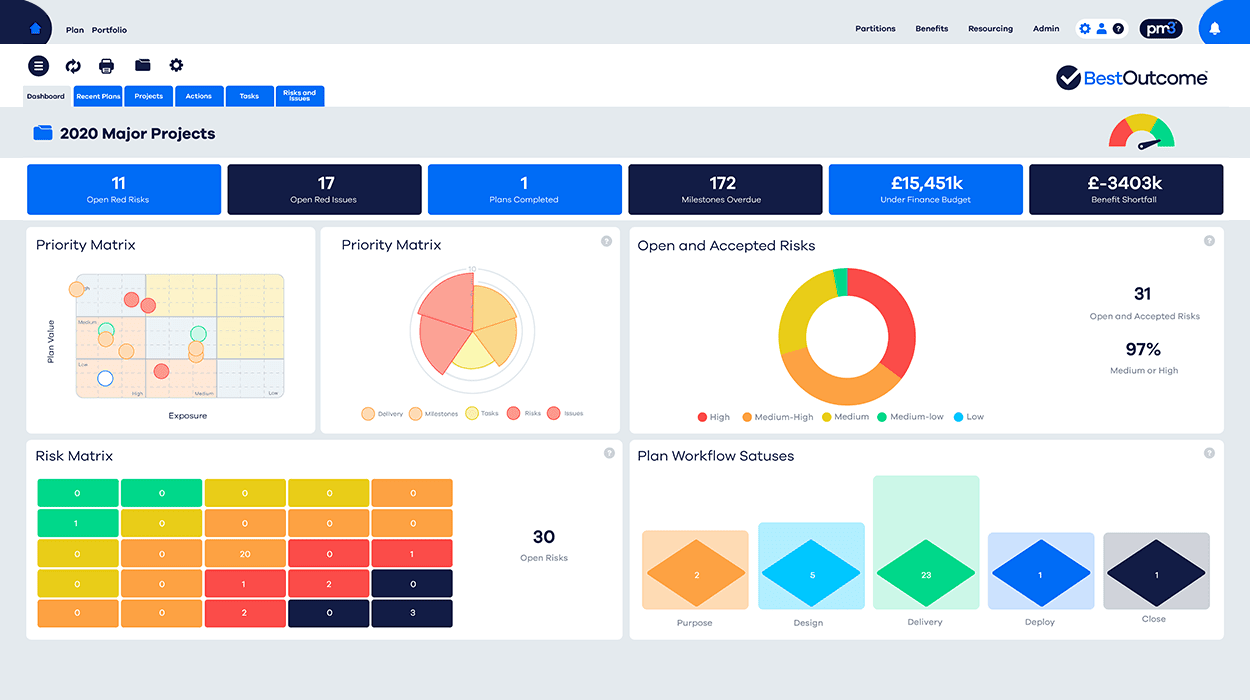
PM3 is an outcome-driven portfolio, programme, and project management solution designed to handle everything from simple stand-alone projects to large-scale business change programmes. By helping teams focus on key elements, streamline resources, and consistently complete tasks, PM3 turns theory into practice.
Here’s how PM3 can act as a catalyst to help you prioritise tasks effectively, give urgent and important tasks the attention they need, and maximise productivity while keeping projects aligned with actual work and business outcomes:
Prioritisation and transformation
PM3 is not just a project management system; it’s a comprehensive tool that can handle programmes and portfolios effectively.
The prioritisation features of PM3 enable you to identify and manage high-priority tasks seamlessly.
Whether it’s determining which projects to focus on, optimising resource allocation, or aligning your workload with strategic objectives, PM3 can be your guiding light in workload prioritisation.
Effective resource management
Managing resources is a critical aspect of workload prioritisation.
PM3’s resource management capabilities offer insights into resource availability and allocation, helping you understand where your ‘pinch points’ may lie.
This is invaluable in ensuring that your workload is aligned with the available resources and that high-priority tasks receive the attention and resources they need to succeed.
Agile and waterfall support
In the dynamic landscape of project management, the ability to adapt to different methodologies is vital. PM3 provides support for both traditional waterfall (such as Prince2™) and agile methods.
This flexibility allows you to choose the approach that best suits your project, ensuring that your workload prioritisation aligns with your chosen project management method.
Effective team collaboration
Collaboration is the cornerstone of successful project management.
PM3 facilitates effective team collaboration, allowing dispersed project teams to work together seamlessly.
Team members can use the PM3 software or the PM3Team app for collaboration, ensuring that high-priority tasks receive the collective attention and effort they require.
Dashboards for decision-making
PM3 offers a range of customisable dashboards, containing over 100 out-of-the-box reports and drill-down capabilities.
These dashboards provide insights into project progress, resource utilisation and benefits realisation.
In terms of workload prioritisation, these dashboards allow you to assess the status of high-priority tasks, resource allocation and the overall progress of your projects, enabling data-driven decision-making.
Continuous improvement
PM3’s comprehensive features support not only effective workload prioritisation but also continuous improvement in your project management approach. By harnessing PM3, you can refine your prioritisation strategies, resource allocation and project management methods, ensuring that your projects stay aligned with your goals.
Whether you’re overseeing a small business or extensive projects, PM3 can take your workload prioritisation to new heights and ensure that your project management efforts thrive.
For more information about how PM3 can help your organisation prioritise its workload, schedule a demo now or contact us at sales@eleco.com/pm3
FAQs
What is the 1 3 5 rule for prioritisation?
The 1-3-5 rule is a simple workload planning method where you choose one big task, three medium tasks, and five small tasks to complete in a day. It helps keep daily priorities realistic and prevents long task lists from becoming unmanageable.
What are the 5 priority levels for tasks?
A practical five-level task priority system is critical, high, medium, low, and backlog. Critical and high-priority tasks usually require immediate attention, while medium, low, and backlog tasks can be scheduled, delegated, or deferred depending on urgency and importance.
What are the 4 P’s of prioritisation?
The 4 P’s of prioritisation can be understood as purpose, priority, planning, and progress. Together, they help teams identify why work matters, decide what should come first, schedule tasks effectively, and review whether priorities are being delivered.
How do you prioritise workload effectively?
To prioritise workload effectively, start by listing all tasks, assessing urgency and importance, assigning due dates, and focusing on high-priority work first. Tools such as the Eisenhower Matrix, workflow automation, delegation, and project management software like PM3 can help keep workloads visible and manageable.
Image Sources: Astrid.IQ
