Key takeaways
- Microsoft Project focuses on project planning and scheduling. It helps teams manage tasks, dependencies, resources, timelines and delivery progress.
- PM3 focuses on project, programme and portfolio management. It connects delivery activity with strategic priorities, governance, benefits, financial performance and resource capacity.
- Microsoft Project Online retired on 30 September 2026. Organisations using it need to assess their replacement options, including Microsoft Planner and other portfolio management platforms.
- The two platforms can work together. PM3 supports importing and exporting detailed Microsoft Project plans, allowing organisations to retain established planning processes while improving portfolio-level visibility.
- The right choice depends on organisational needs. Teams primarily managing individual project schedules have different requirements from PMOs overseeing complex portfolios, multiple stakeholders and strategic investment decisions.
Table of Contents
PM3 vs Microsoft Project: Understanding the Key Differences
Microsoft Project Online Has Retired
Which Platform Is Best Suited to Your Organisation?
PM3 vs Microsoft Project: Feature-by-Feature Comparison
Built for PMOs, Portfolios and Regulated Organisations
Adoption, Training and Support
Already Using Microsoft Project? PM3 Can Work Alongside Your Plans
Time, Cost and Expense Management with PM3Time
FAQs

PM3 vs Microsoft Project: Understanding the key differences
Choosing between PM3 and Microsoft Project starts with understanding the problem your organisation needs to solve.
Microsoft Project is best known for detailed project planning and scheduling. It provides tools for mapping tasks, building Gantt charts, setting baselines, tracking dependencies and managing resources. Its desktop application is particularly useful when project managers need detailed control over delivery schedules.
Microsoft’s wider work management offering now also includes Planner, with premium capabilities for more advanced project planning.
PM3 takes a broader approach. It is a project, programme and portfolio management (PPM) platform designed to bring delivery information into a shared environment. Alongside project plans, it supports portfolio reporting, benefits realisation, financial management, resource capacity planning, prioritisation and governance.
The distinction is between managing individual project plans and managing a collection of projects as part of an organisation’s wider objectives.
A project manager might use Microsoft Project to understand why a milestone is slipping. A PMO might use PM3 to understand which projects are at risk across the portfolio, where resource bottlenecks are developing and whether planned benefits remain achievable.
Both perspectives matter. The question is how much organisational visibility and control you need.

Important: Microsoft Project Online has retired
Microsoft Project Online officially retired on 30 September 2026. This is particularly important for organisations reviewing their existing Microsoft PPM infrastructure.
The retirement does not mean that every Microsoft Project product has disappeared. Microsoft Project desktop remains available, as does Project Server Subscription Edition. Project for the web was transitioned into the unified Microsoft Planner experience in August 2025.
Microsoft Planner brings together task management and more advanced project capabilities. Depending on the subscription, Planner’s premium features include Gantt-style timeline views, dependencies, critical path, resource workload views, backlogs, sprints and portfolio capabilities.
Microsoft is also introducing AI assistance through Planner and Planner Agent, with availability and functionality depending on licensing and configuration.
For organisations previously using Project Online, the immediate priority is to assess their existing workflows, integrations, reporting requirements and data migration needs. The new Planner experience should be evaluated against those requirements rather than assumed to be a like-for-like replacement for every Project Online capability.
Read Microsoft’s official Project Online retirement guidance before planning a transition.
Which platform is best suited to your organisation?
When PM3 is the stronger fit
PM3 is worth considering if your organisation needs to coordinate projects across departments, programmes or strategic portfolios. It is particularly relevant where a PMO must provide consistent governance and reliable information to senior stakeholders.
Typical requirements include:
- Connecting project delivery to strategic objectives and investment priorities.
- Tracking benefits, expected outcomes, budgets, forecasts and spend.
- Identifying resource capacity constraints and competing demands across projects.
- Standardising reporting and governance across teams.
- Providing portfolio dashboards and audit-ready information for senior leaders, boards and assurance functions.
- Supporting different delivery approaches, including agile, waterfall and hybrid methodologies.
- Establishing consistent project management practices through training and onboarding.
When Microsoft Project is the stronger fit
Microsoft Project may be sufficient if the main requirement is detailed project scheduling and control. It is a natural option for organisations already equipped with Microsoft Project expertise and established Microsoft workflows.
It is particularly useful when teams need to:
- Build and maintain detailed schedules.
- Map task dependencies, milestones and critical paths.
- Establish baselines and compare planned versus actual progress.
- Assign resources and manage workload at project level.
- Create project reports and analyse schedule information.
- Use Microsoft 365 tools and related Microsoft services in existing workflows.
Planner premium capabilities may also suit teams looking for collaborative boards, sprint planning and workload views within Microsoft’s work management environment.

PM3 vs Microsoft Project: Feature-by-feature comparison
The following table compares PM3 with Microsoft Project’s desktop capabilities and the broader Microsoft Planner offering. Microsoft features vary by application and licence, so keep in mind that they should not be understood as one uniform product.
| Feature | PM3 | Microsoft Project / Planner |
|---|---|---|
| Overall focus | Project, programme and portfolio management in one configurable environment. | Detailed scheduling through Project desktop, with collaborative task and project management through Planner. |
| Portfolio management | Portfolio-level visibility, prioritisation, reporting and benefits tracking. | Portfolio capabilities are available in the wider Microsoft offering, depending on the product and plan. |
| Programme management | Supports projects, programmes and business change programmes. | Can support coordinated project delivery, but the available capabilities depend on the application and configuration. |
| Project planning | Project plans, milestones, actions and dependencies within a wider PPM framework. | Detailed task scheduling and project plans, particularly in Project desktop. |
| Gantt charts | Supports Gantt-based planning. | Gantt and timeline views are available in Project desktop and eligible Planner premium plans. |
| Kanban and agile | Supports Kanban, Scrum, user stories, sprints and boards. | Planner premium supports boards, backlogs and sprints; Project desktop is more schedule-oriented. |
| Waterfall and hybrid delivery | Supports waterfall and hybrid approaches as well as agile methods. | Waterfall scheduling is well supported; hybrid approaches depend on how the Microsoft tools are configured and combined. |
| Milestones and dependencies | Tracks milestones and dependencies across plans and management levels. | Strong task dependency and milestone controls in Project; premium Planner also supports dependencies and milestones. |
| Critical path | Supports structured project planning and schedule oversight. | Detailed critical-path analysis in Project desktop; critical path is also available in Planner premium plans. |
| Resource management | Portfolio-wide resource allocation, skills, capacity, bottlenecks and resource demand. | Resource assignments, resource pools and scheduling tools, with additional workload views depending on the product. |
| Financial management | Supports portfolio financial visibility, budgets, forecasts and spend. | Supports project cost planning and tracking; wider financial consolidation may require additional tools or integrations. |
| Benefits realisation | Tracks benefits, expected outcomes and alignment with business objectives. | Benefits tracking may need complementary processes or tools, depending on the Microsoft setup. |
| Strategic alignment | Helps assess and prioritise projects against strategic objectives and capacity. | Supports project and portfolio planning, with the specific selection and prioritisation capabilities dependent on the product and licence. |
| Reporting and dashboards | Offers 200+ out-of-the-box reports and drill-down dashboards, according to PM3’s published product information. | Project desktop provides built-in customisable reports; broader reporting options vary across Project, Planner and related services. |
| Power BI | Direct Power BI integration for analytics and executive reporting. | Power BI can be used with supported Microsoft project data and configurations. |
| Governance and audit | Emphasis on structured governance, assurance and portfolio reporting. | Project data and reporting capabilities support oversight, with governance dependent on the wider implementation. |
| Security and hosting | Supplier materials describe UK data hosting, ISO 27001 certification and Cyber Essentials Plus accreditation. | Security, compliance and data residency depend on the specific Microsoft service, tenant and configuration. |
| Microsoft integrations | Integrates with Microsoft Project, Teams, SharePoint and Power BI; finance and ERP integrations are also supported. | Strong integration across Microsoft’s own work management and productivity ecosystem. |
| Microsoft Project import/export | Imports and exports detailed Microsoft Project plans. | Native support for Project formats and workflows, depending on the application. |
| Training and support | PM3Learn, structured learning resources, templates, expert training and mentoring. | Microsoft help and learning resources, with additional deployment and training support available through partners. |
| Time, cost and expenses | PM3Time provides dedicated time, cost and expense management. | Requirements may be met through other Microsoft or third-party tools, depending on the setup. |
| AI and automation | Platform capabilities and integrations should be assessed against the organisation’s specific requirements. | Planner and Planner Agent offer AI-assisted task creation and other capabilities, subject to licensing and availability. |
| Lifecycle considerations | An active PPM platform with published support, learning and development resources. | Project Online has retired; Project desktop, Project Server Subscription Edition and Planner remain distinct options. |
The practical difference is not that one platform has features the other entirely lacks. It is that PM3 brings more emphasis to the governance and management of the whole portfolio, whereas Microsoft Project is strongly associated with schedule control and detailed planning.

Built for PMOs, portfolios and regulated organisations
A PMO needs more than a collection of project plans. It needs consistent information that helps decision-makers understand delivery confidence, financial exposure, resource constraints and the likely value of their investments.
PM3 is designed to bring this information together. Its configurable structure supports different organisational methodologies, while portfolio dashboards and reporting provide visibility beyond individual projects. Benefits management helps connect delivery activity with intended outcomes, and resource management supports decisions about competing priorities and capacity.
For organisations in public services, healthcare and other regulated environments, reporting and traceability are especially important. PM3’s published healthcare capabilities include risk management and audit traceability.
Security is an important consideration when choosing a PPM platform. PM3 is hosted in Microsoft Azure UK data centres and holds ISO 27001 certification and Cyber Essentials Plus accreditation.
Organisations should confirm the scope of these certifications and review the platform’s data residency arrangements and security controls as part of their procurement process.
Adoption, training and support
Software only delivers value when people use it consistently. That can be difficult in organisations where project managers have different levels of experience or where project responsibilities sit alongside other jobs.
Microsoft provides online help and getting-started guides for its products. Organisations that need additional support can also work with specialist Microsoft partners who offer implementation and training services. For organisations already experienced with Microsoft Project, the available documentation and internal expertise may be sufficient.
PM3 places greater emphasis on embedded project management and PMO enablement through PM3Learn. Its resources include step-by-step guides, videos, templates, project management courses and PMO learning materials. It also offers expert training and mentoring from PPM specialists.
This approach is relevant to PMOs seeking to standardise processes across teams or support accidental project managers who have acquired delivery responsibilities without formal project management training.
The distinction is between learning how to operate a tool and building the organisational practices needed to use it effectively.
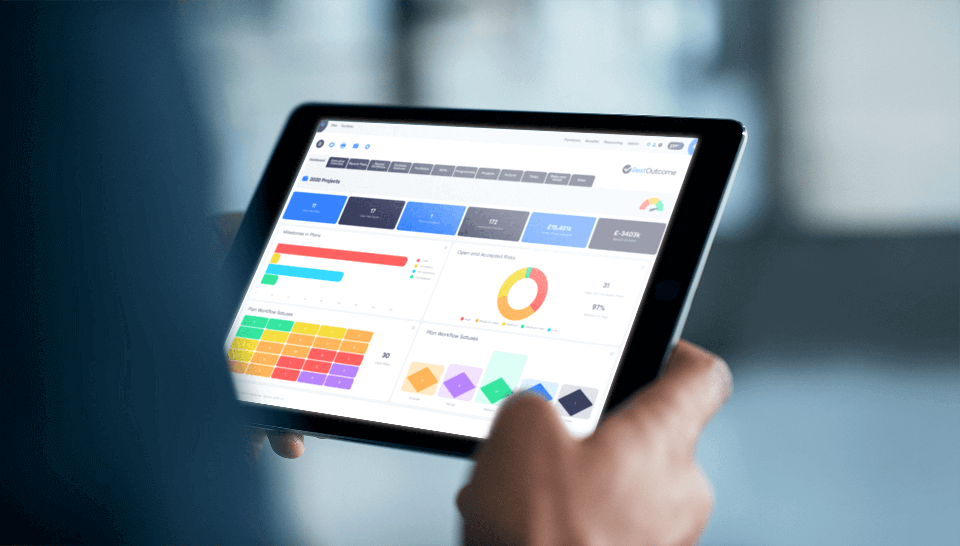
Already using Microsoft Project? PM3 can work alongside your plans
Moving to a portfolio management platform does not necessarily mean abandoning existing project schedules.
PM3 supports the import and export of detailed Microsoft Project plans. This gives organisations a way to retain familiar scheduling workflows while connecting project-level information to broader portfolio reporting, governance and benefits management.
PM3 also integrates with Microsoft Teams, SharePoint and Power BI. The precise workflow will depend on how the organisation configures its systems, so import/export requirements and integration needs should be tested before implementation.
Time, cost and expense management with PM3Time
PM3Time extends the wider ecosystem with dedicated time, cost and expense management.
It gives organisations visibility into how employees and contractors spend their time across projects and non-billable work. Features include mobile or application-based time entry, timesheet and expense approvals, contractor cost management, project costing, utilisation targets and reporting.
PM3Time also integrates with Xero and allows managers to approve timesheets and expenses by email.
For organisations that need to understand not just planned resource allocation but also actual time and associated costs, PM3Time provides an additional source of management information.
See how PM3 compares with Microsoft Project for your organisation
The decision ultimately comes down to the level at which you need to manage delivery.
If your priority is detailed scheduling, dependencies and project-level control, Microsoft Project remains a relevant option. If your organisation needs shared portfolio visibility, consistent PMO governance, benefits tracking and resource capacity management, PM3 offers a broader PPM approach. The two can also work together.
Book a PM3 demo to explore how the platform could support your current project, programme and portfolio management processes, including reporting, governance, resource planning and Microsoft Project integration.
 Success Stories
Find out how PM3 is supporting successful delivery across industries.
Each story shows how PM3 has enabled organisations to strengthen governance, manage scope effectively, and achieve measurable results.
FAQs
1. What is Microsoft Project?
Microsoft Project is a project management application used to plan, schedule and track work. Project desktop provides Gantt charts, dependencies, milestones, baselines, resource planning and reporting. Microsoft’s wider work management offering also includes Planner, with premium project management features.
What is Microsoft Project used for?
Microsoft Project is used to create project schedules, assign resources, manage dependencies, establish baselines and monitor progress. Its detailed scheduling capabilities help project managers understand delivery timelines and assess the effects of changes to tasks and resources.
Is Microsoft Project Online being retired?
Yes. Microsoft Project Online officially retired on 30 September 2026. Project desktop and Project Server Subscription Edition remain available, while Project for the web has transitioned into Microsoft Planner. Organisations formerly using Project Online should review Microsoft’s migration guidance and assess which capabilities they need to retain.
What is PM3 used for?
PM3 is a project, programme and portfolio management platform. It helps organisations coordinate delivery, prioritise projects, manage resources, track benefits, monitor financial performance and provide reporting and governance across a portfolio.
Is PM3 an alternative to Microsoft Project?
Yes. PM3 can be an alternative for organisations looking for broader portfolio and PMO management rather than standalone project scheduling. It can also complement Microsoft Project because it supports importing and exporting detailed project plans.
Can PM3 import and export Microsoft Project plans?
Yes. PM3’s published features include importing and exporting detailed Microsoft Project plans. Organisations should test the specific plan formats, fields, dependencies and reporting workflows they rely on before implementation.
Which is better for PMOs: PM3 or Microsoft Project?
It depends on the PMO’s responsibilities. Microsoft Project is well suited to detailed scheduling and project-level control. PM3 is designed for wider portfolio visibility, prioritisation, benefits tracking, resource capacity and standardised governance. For a PMO overseeing multiple projects and programmes, these broader capabilities may be particularly valuable.
Does PM3 support agile, waterfall and hybrid delivery?
Yes. PM3’s published product information describes support for agile, waterfall and hybrid approaches, including Kanban, Scrum, user stories, sprints and boards.
How do PM3 and Microsoft Project compare on reporting and resource management?
Microsoft Project provides detailed schedule reports and resource planning tools. PM3 places greater emphasis on reporting and resource management across the whole portfolio, including configurable dashboards, benefits, resource capacity, skills and demand. The appropriate choice depends on whether the primary need is project-level analysis or organisation-wide decision-making.
Does PM3 include training and onboarding support?
Yes. PM3 includes PM3Learn, with project management courses, PMO learning materials, guides, videos and templates. The supplier also offers training and mentoring from PPM specialists.
